HOTSPOT -
You plan to create the Power BI model shown in the exhibit. (Click the Exhibit tab.)
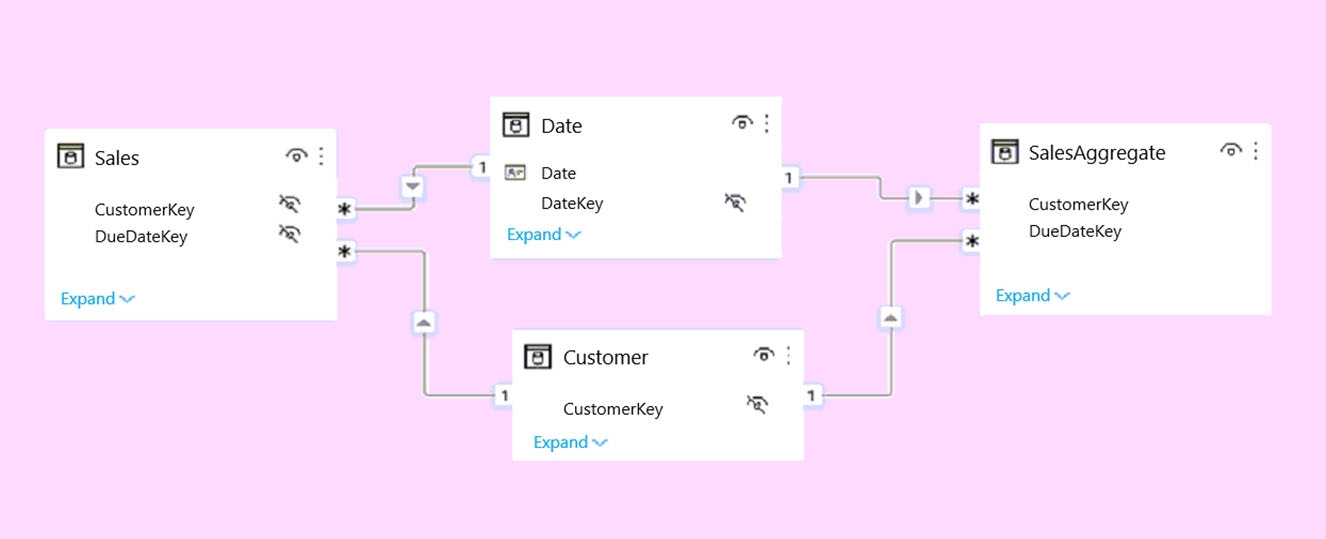
The data has the following refresh requirements:
✑ Customer must be refreshed daily.
✑ Date must be refreshed once every three years.
✑ Sales must be refreshed in near real time.
✑ SalesAggregate must be refreshed once per week.
You need to select the storage modes for the tables. The solution must meet the following requirements:
✑ Minimize the load times of visuals.
✑ Ensure that the data is loaded to the model based on the refresh requirements.
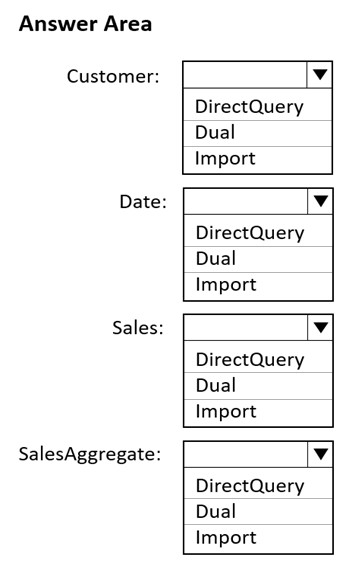
Which storage mode should you select for each table? To answer, select the appropriate options in the answer area.
NOTE: Each correct selection is worth one point.
Hot Area:
You have a CSV file that contains user complaints. The file contains a column named Logged. Logged contains the date and time each complaint occurred. The data in Logged is in the following format: 2018-12-31 at 08:59.
You need to be able to analyze the complaints by the logged date and use a built-in date hierarchy.
What should you do?
A.
Apply a transformation to extract the last 11 characters of the Logged column and set the data type of the new column to Date.
B.
Change the data type of the Logged column to Date.
C.
Split the Logged column by using at as the delimiter.
D.
Apply a transformation to extract the first 11 characters of the Logged column.
You have a Microsoft Excel file in a Microsoft OneDrive folder.
The file must be imported to a Power BI dataset.
You need to ensure that the dataset can be refreshed in powerbi.com.
Which two connectors can you use to connect to the file? Each correct answer presents a complete solution.
NOTE: Each correct selection is worth one point.
A.
Excel Workbook
B.
Text/CSV
C.
Folder
D.
SharePoint folder
E.
Web
HOTSPOT -
You are profiling data by using Power Query Editor.
You have a table named Reports that contains a column named State. The distribution and quality data metrics for the data in State is shown in the following exhibit.
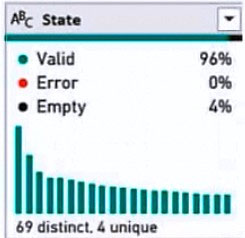
Use the drop-down menus to select the answer choice that completes each statement based on the information presented in the graphic.
NOTE: Each correct selection is worth one point.
Hot Area:

HOTSPOT -
You have two CSV files named Products and Categories.
The Products file contains the following columns:
✑ ProductID
✑ ProductName
✑ SupplierID
✑ CategoryID
The Categories file contains the following columns:
✑ CategoryID
✑ CategoryName
✑ CategoryDescription
From Power BI Desktop, you import the files into Power Query Editor.
You need to create a Power BI dataset that will contain a single table named Product. The Product will table includes the following columns:
✑ ProductID
✑ ProductName
✑ SupplierID
✑ CategoryID
✑ CategoryName
✑ CategoryDescription
How should you combine the queries, and what should you do on the Categories query? To answer, select the appropriate options in the answer area.
NOTE: Each correct selection is worth one point.
Hot Area:
